Comparing Approaches: Commercial SaaS vs. Self-Hosted Remote Access
Our on-call pager shrieked at 2:15 AM on a Sunday. A primary database migration had stalled mid-schema update on an isolated node. We jumped on TeamViewer, only to hit a false-positive commercial use block after 47 seconds. AnyDesk was no better, spinning indefinitely while negotiating over saturated European relays. When production stalls, piping session keystrokes and server telemetry through a third-party cloud is an operational liability.
Remote administration typically relies on three architectures:
- Commercial Cloud Relays (TeamViewer, AnyDesk): Zero server maintenance, but zero sovereignty. You deal with random session timeouts, surprise subscription tiers, and congested relay hops that spike input lag from 20ms to 450ms.
- Network Tunnels with Direct RDP/VNC (WireGuard + FreeRDP): Solid security, but fragile across restrictive networks. Every technician and endpoint needs active tunnel configs, synced certificates, and correct routing tables before you can even establish a handshake.
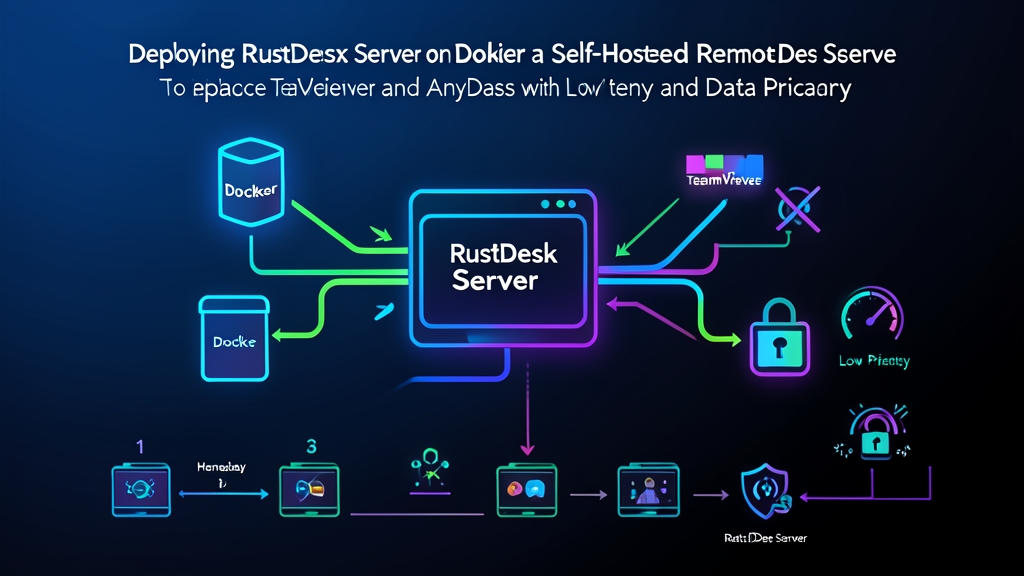
- Self-Hosted Signaling & Relay (RustDesk Server): TeamViewer-style convenience backed by complete infrastructure control. You host both the rendezvous coordinator (
hbbs) and relay proxy (hbbr). Clients query your server for direct peer-to-peer UDP punch-through. If that fails, your server proxies the encrypted stream directly.
Pros & Cons of Self-Hosting RustDesk on Docker
Before punching holes in your firewall, balance the operational trade-offs of maintaining your own stack.
The Advantages
- Predictable Latency: Running a relay close to your nodes drops round-trip times noticeably. In our tests, switching from public relays to a local $5 VPS shaved RTT from 140ms down to 18ms.
- Tighter Data Security: Connection metadata, device IDs, and session timestamps stay inside your perimeter. Third-party cloud providers never touch your keys.
- Minimal Resource Footprint: Both binaries are compiled in Rust. Together,
hbbsandhbbridle at roughly 25MB of RAM and rarely exceed 150MB under active session load. - Frictionless Portability: Docker packaging makes disaster recovery straightforward. Migrating the full stack to another cloud instance takes under three minutes.
The Trade-Offs
- Public Exposure & Port Management: You need a public IPv4 address or dynamic DNS host, plus several open TCP and UDP ingress ports.
- Upstream Bandwidth Costs: When clients hit strict symmetric NATs or mobile hotspots, peer-to-peer handshakes fail. The relay proxies all display traffic, easily consuming 1.5 to 5 Mbps of server upload per 1080p stream.
- Key Lifecycle Management: You must distribute and pin the public key across all client profiles to prevent open-relay abuse.
Recommended Architecture
When remote networks lock down, having an independent, out-of-band console saves hours of downtime.
A resilient RustDesk deployment pairs two core binaries on an isolated container bridge or host interface:
- hbbs (ID and Rendezvous Service): Registers clients, tracks heartbeats, and brokers peer-to-peer NAT punch-through. It listens on TCP/UDP 21115 through 21118.
- hbbr (Relay Proxy Service): Steps in when clients cannot establish a direct P2P connection through carrier-grade NAT (CGNAT). It proxies encrypted session streams over TCP 21117 and 21119.
Firewall & Port Blueprint
Configure your cloud security group and host firewall with the following ingress rules:
21115/tcp: NAT type testing21116/tcp: TCP hole punching and connection brokering21116/udp: ID registration and heartbeat queries21117/tcp: Session data relay21118/tcp&21119/tcp: Web client interfaces (optional)
Step-by-Step Docker Compose Deployment
Here is the exact Compose configuration we run on hardened production jump boxes.
Step 1: Set Up Directories and the Manifest
Create a dedicated configuration directory on your host:
mkdir -p /opt/rustdesk-server/data
cd /opt/rustdesk-server
Save the following as docker-compose.yml. Update rustdesk.example.com with your external FQDN or public static IP:
services:
  hbbs:
    image: rustdesk/rustdesk-server:latest
    container_name: rustdesk_hbbs
    restart: always
    command: hbbs -r rustdesk.example.com:21117 -k _
    volumes:
      - ./data:/root
    network_mode: host
    depends_on:
      - hbbr

  hbbr:
    image: rustdesk/rustdesk-server:latest
    container_name: rustdesk_hbbr
    restart: always
    command: hbbr -k _
    volumes:
      - ./data:/root
    network_mode: host
The -k _ parameter enforces asymmetric key validation. Without it, unauthorized users who scan your ports can hijack your server as a free transit relay.
Step 2: Start the Containers
Launch the services in the background:
docker compose up -dConfirm that both processes are running and listening on the designated ports:
docker compose ps
ss -tulpn | grep -E '2111[5-9]'
Step 3: Retrieve the Public Key
During its first boot, hbbs writes an Ed25519 keypair to the mounted data folder. Print the public key:
cat /opt/rustdesk-server/data/id_ed25519.pubCopy this key string. Every managed client will need it to authenticate against your server.
Step 4: Configure the Desktop Client
- Open the RustDesk client on your workstation.
- Click the three-dot menu beside your ID and select Settings > Network.
- Click Unlock Network Settings and fill in your infrastructure parameters:
- ID Server:
rustdesk.example.com:21116 - Relay Server:
rustdesk.example.com:21117 - Key: Paste the string copied from
id_ed25519.pub
- ID Server:
- Click Apply. Check the status indicator at the bottom left of the window. It should change to a green icon marked Ready.
Troubleshooting Common Deployment Issues
- Dropped UDP Packets: Sluggish mouse response and high input latency often point to UDP dropping on port
21116/udp. Test connectivity from an external machine usingnc -u -z -v rustdesk.example.com 21116. - Bridge vs. Host Networking: Setting
network_mode: hostbypasses Docker iptables overhead. If your environment requires container bridge isolation, bind every port explicitly across both TCP and UDP definitions in your Compose file.