Context & Why
Code reviews slow down quickly as teams expand. When a fifteen-person engineering group pushes forty pull requests (PRs) a week, review queues back up fast.
Senior engineers end up burning six to eight hours each week scanning diffs for routine syntax errors. Meanwhile, real security bugs—unvalidated user input, leaked tokens, and unsafe SQL queries—slip quietly into staging branches. Traditional SAST tools like SonarQube or Semgrep catch standard syntax patterns, but high false-positive rates (frequently above 30%) train developers to ignore their alerts.
Large Language Models (LLMs) understand code semantics, contextual logic, and developer intent far better than static regex rules. However, sending proprietary source code to cloud-hosted AI review services introduces major compliance hurdles.
Teams working under SOC 2, ISO 27001, or HIPAA guidelines cannot ship private codebases, proprietary algorithms, or internal API schemas to third-party providers like OpenAI or Anthropic. Once private code leaves your subnet, you lose control over audit trails and data retention.
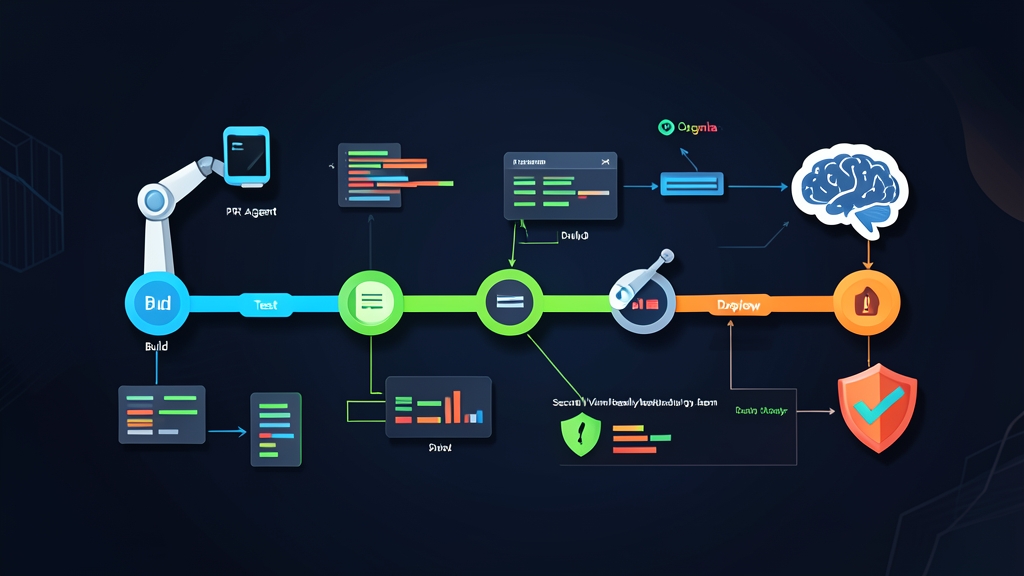
Running the review pipeline inside your private infrastructure resolves this tension. Pairing PR-Agent (an open-source Git review agent) with Ollama (a lightweight local LLM runner) lets you host an autonomous reviewer directly on your self-hosted CI/CD runners. Source code never leaves your VPC. Monthly token fees drop to zero. Best of all, engineers get context-aware security feedback on their pull requests within 60 to 90 seconds.
We rolled out this setup across internal staging services. It serves as an immediate first responder on every opened PR, catching missed boundary checks and edge cases before a human reviewer touches the branch.
Installation
For smooth inference without long CI waits, run Ollama on an instance with dedicated GPU compute. An NVIDIA RTX 3060 (12 GB), T4 (16 GB), or A10 will comfortably process 30 to 50 tokens per second. If you must use CPU-only bare-metal servers, a quantized model (Q4_K_M) still handles diffs under 200 lines, though latency will increase from seconds to roughly two minutes.
Step 1: Install and Launch Ollama
Install Ollama on your Linux runner using the official script:
curl -fsSL https://ollama.com/install.sh | shBy default, the Ollama daemon listens only on 127.0.0.1:11434. If PR-Agent runs inside a Docker container using bridge networking, Ollama must bind to all local interfaces. Configure the systemd service override:
sudo mkdir -p /etc/systemd/system/ollama.service.d
echo -e '[Service]\nEnvironment="OLLAMA_HOST=0.0.0.0:11434"' | sudo tee /etc/systemd/system/ollama.service.d/override.conf
sudo systemctl daemon-reload
sudo systemctl restart ollama
Step 2: Pull an Optimized Coding Model
General-purpose foundation models often stumble on nuanced code reviews. Instead, use an instruction-tuned model designed specifically for software engineering. Qwen2.5-Coder (7B) delivers top-tier code reasoning while requiring just under 5 GB of VRAM:
# Download the 7B parameter model (~4.7 GB download)
ollama pull qwen2.5-coder:7b

# Run a sanity check via CLI
ollama run qwen2.5-coder:7b "Identify potential vulnerabilities in: query = f\"SELECT * FROM users WHERE id = {user_input}\""
Step 3: Obtain PR-Agent
PR-Agent is packaged as a standalone Docker image containing all Git provider integrations and prompt pipelines. Pull the image onto your runner host:
docker pull codiumai/pr-agent:latestConfiguration
Ollama provides an OpenAI-compatible API at http://<host>:11434/v1. PR-Agent can talk directly to this local endpoint by overriding its base URL and model settings.
Step 1: Create the PR-Agent Configuration
Add a configuration file named .pr_agent.toml to your repository root or CI deployment directory:
[config]
model = "qwen2.5-coder:7b"
fallback_models = ["qwen2.5-coder:7b"]
git_provider = "github"

[openai]
api_base = "http://127.0.0.1:11434/v1"
key = "none"

[pr_reviewer]
require_score_review = false
require_tests_review = true
require_security_review = true
num_code_suggestions = 4
inline_code_comments = true

[pr_description]
publish_labels = false
add_original_user_description = true
Step 2: Automate with GitHub Actions on a Self-Hosted Runner
Create a GitHub workflow file at .github/workflows/pr-review.yml. Direct the job to your self-hosted runner pool where Ollama runs:
name: Automated Local Code Review

on:
  pull_request:
    types: [opened, synchronize, reopened]

jobs:
  local-pr-agent:
    runs-on: self-hosted
    permissions:
      contents: read
      pull-requests: write
      issues: write
    steps:
      - name: Checkout Codebase
        uses: actions/checkout@v4

      - name: Run PR-Agent Reviewer via Docker
        env:
          OPENAI_KEY: "none"
          OPENAI_API_BASE: "http://127.0.0.1:11434/v1"
          CONFIG_MODEL: "qwen2.5-coder:7b"
          GITHUB_TOKEN: ${{ secrets.GITHUB_TOKEN }}
          github_action_config.auto_review: "true"
          github_action_config.auto_describe: "false"
          github_action_config.auto_improve: "false"
        run: |
          docker run --rm \
            --net="host" \
            -e OPENAI_KEY="$OPENAI_KEY" \
            -e OPENAI.API_BASE="$OPENAI_API_BASE" \
            -e CONFIG.MODEL="$CONFIG_MODEL" \
            -e GITHUB.USER_TOKEN="$GITHUB_TOKEN" \
            -e GITHUB.DEPLOYMENT_TYPE="app" \
            -v $(pwd)/.pr_agent.toml:/app/.pr_agent.toml \
            codiumai/pr-agent:latest \
            --pr_url="${{ github.event.pull_request.html_url }}" \
            review
Using --net="host" allows the container to talk directly to Ollama at 127.0.0.1:11434 without passing through Docker bridge NAT. Because Ollama does not require authentication, the placeholder value "none" satisfies PR-Agent’s client requirement.
Verification & Monitoring
Once you push the workflow file, test the automation pipeline with an intentionally flawed pull request.
Step 1: Test with a Vulnerable Pull Request
Branch off main and introduce an insecure query in a test file, such as auth.py:
import sqlite3

def get_user_records(user_id):
    conn = sqlite3.connect("users.db")
    cursor = conn.cursor()
    # Critical flaw: raw string formatting creates SQL injection
    query = f"SELECT * FROM accounts WHERE id = '{user_id}'"
    cursor.execute(query)
    return cursor.fetchall()
Push the branch and open a PR. Within two minutes, the runner evaluates the git diff, queries Ollama, and posts a structured comment directly onto the PR discussion:
- Vulnerability Flag: Flags
get_user_recordsfor unescaped SQL parameter interpolation. - Security Checklist: Marks unsanitized user inputs as failed checks.
- Concrete Patch: Recommends parameterized binding:
cursor.execute("SELECT * FROM accounts WHERE id = ?", (user_id,)).
Step 2: Monitor Performance and Resource Consumption
Tracking inference load prevents the CI runner from running out of memory. While a review is in progress, check GPU memory allocation and temperature in real time:
watch -n 1 nvidia-smiTo inspect active token throughput or troubleshoot HTTP communication errors, inspect the Ollama service log directly:
journalctl -u ollama -f --no-tailStep 3: Handling Token Limits on Massive Diffs
By default, Ollama initializes models with a 2,048-token context window (num_ctx). Large diffs with autogenerated schema files or dependency lockfiles will truncate under that limit. Qwen2.5-Coder supports much larger contexts natively. You can expand Ollama’s active window to 8,192 tokens by defining a custom Modelfile:
FROM qwen2.5-coder:7b
PARAMETER num_ctx 8192
PARAMETER temperature 0.1
Keep in mind that expanding num_ctx from 2,048 to 8,192 allocates approximately 1.5 GB of additional VRAM for the KV cache. Register the custom variant:
ollama create qwen2.5-coder-8k -f ./ModelfileUpdate model = "qwen2.5-coder-8k" inside your .pr_agent.toml. Lowering the temperature to 0.1 keeps the reviewer deterministic, reducing hallucinations and focusing comments purely on genuine functional and security flaws.
This self-hosted pipeline delivers automated security screening on every commit. Your engineering team spots regressions earlier, while your proprietary code remains strictly confined to your own servers.