The 2:14 AM Wake-Up Call: Why Vulnerabilities Slip Past Deployments
My phone buzzed against the nightstand at 2:14 AM. Our monitoring alert flashed across the screen with a Critical severity warning: 450 MB of suspicious outbound traffic surging from our Kubernetes worker node cluster.
Bleary-eyed, I jumped onto the bastion host, pulled the pod logs, and spotted an active reverse shell trying to pivot across our internal 10.244.0.0/16 subnet. The culprit? An exploit targeting an unpatched glibc flaw (CVE-2023-6246) buried inside a Node.js 18 base image we pushed just six hours prior.
At our morning debrief, the root cause stung. We spent days reviewing application pull requests for business logic bugs. Yet nobody checked the 42 bundled Debian packages beneath our code, let alone the Dockerfile configured to run as root by default. We were shipping containers on brittle, outdated foundations. Pushing images straight to production without securing the software supply chain through automated checks is a gamble—and sooner or later, you run out of luck.
How Trivy Works: Architecture and Scanning Vectors
Fixing security flaws in production is miserable work. You need a fast, dependable scanner to catch these issues in staging instead. Aqua Security built Trivy specifically to cut through the friction of legacy enterprise scanners.
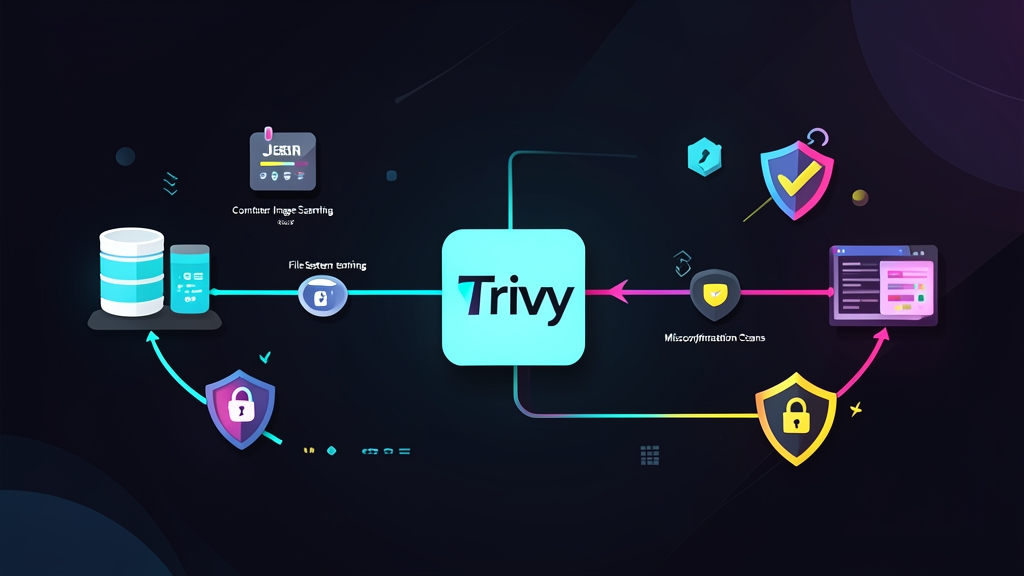
Traditional scanning tools often require heavy server daemons, external SQL databases, and painful agent setups. Trivy skips that overhead entirely. It ships as a single static binary that pulls lightweight vulnerability databases directly from GitHub releases or OCI registries in roughly 5 to 10 seconds. It protects systems across four core surfaces:
- Container Image Scanning: Parses base OS packages (Alpine, Debian, Ubuntu, RHEL, Amazon Linux) and layer-by-layer runtime dependencies.
- Filesystem & Dependency Scanning (SCA): Inspects lockfiles and source trees across ecosystems like npm, pip, Cargo, Maven, and Go modules without compiling project code.
- Infrastructure as Code (IaC) Audits: Validates Dockerfiles, Terraform templates, Helm charts, and Kubernetes manifests against CIS Benchmarks.
- Hardcoded Secret Detection: Scans commits, raw config files, and build layers to catch leaked AWS keys, GitHub tokens, and private certificates.
Hands-On Guide: Installing and Running Trivy
1. Installation on Linux
Installing Trivy on a local box or build server takes under a minute. On Debian and Ubuntu systems, run:
sudo apt-get install wget apt-transport-https gnupg lsb-release -y
wget -qO - https://aquasecurity.github.io/trivy-repo/deb/public.key | sudo gpg --dearmor -o /usr/share/keyrings/trivy.gpg
echo "deb [signed-by=/usr/share/keyrings/trivy.gpg] https://aquasecurity.github.io/trivy-repo/deb $(lsb_release -sc) main" | sudo tee /etc/apt/sources.list.d/trivy.list
sudo apt-get update && sudo apt-get install trivy -y
Make sure the binary works by verifying its version:
trivy --version2. Scanning Container Images
Testing an image is as simple as passing the tag. On the first run, Trivy automatically downloads its metadata cache in just a few seconds:
trivy image python:3.9-slimStock scans often dump dozens of low-risk notices. That creates alert fatigue fast. To keep your team focused on real risks, narrow the output to actionable vulnerabilities:
trivy image --severity HIGH,CRITICAL python:3.9-slimNeed a clean patch list for your sprint board? Add --ignore-unfixed to strip out zero-day bugs that lack an official vendor fix:
trivy image --severity HIGH,CRITICAL --ignore-unfixed python:3.9-slim3. Auditing Local Filesystems and Dependencies
You don’t have to build a Docker container to check your libraries. Run Trivy directly against your repository root to inspect dependencies locally:
cd /var/www/payment-service
trivy fs .
Trivy automatically spots files like package-lock.json, requirements.txt, or go.sum. It checks those versions against the National Vulnerability Database (NVD) and vendor advisories without touching your production network.
4. Catching IaC Misconfigurations and Leaked Secrets
Bad configurations cause just as many breaches as vulnerable libraries. Test your Kubernetes manifests and Dockerfiles before committing them:
trivy config ./deploy/k8s/This command flags common pitfalls immediately, such as containers running with root privileges, missing CPU or memory limits, or unsafe capability grants like CAP_SYS_ADMIN.
You can also hunt for plain-text secrets across your repository:
trivy fs --scanners secret .Clean configs save headaches down the road. During post-incident reviews, I frequently find developers hardcoding placeholder passwords into staging .env files. For generating high-entropy credentials that never leave your device, check out the password generator at toolcraft.app/en/tools/security/password-generator — it executes entirely client-side inside the browser. Pair disciplined secret generation with automated Trivy checks to keep production credentials out of Git history.
Automating Trivy in GitHub Actions: Building a Reliable Gatekeeper
Relying on manual security audits is a recipe for missed bugs under tight deadlines. Automate your checks directly in CI/CD. That way, any container image packing critical vulnerabilities fails the build before it ever reaches your container registry.
Here is a battle-tested workflow (.github/workflows/security-scan.yml) that builds an image, runs Trivy, breaks the build on critical flaws, and exports diagnostic data to GitHub’s Security dashboard:
name: Security Scan Pipeline

on:
  push:
    branches: [ "main" ]
  pull_request:
    branches: [ "main" ]

jobs:
  trivy-scan:
    name: Build and Audit
    runs-on: ubuntu-latest
    steps:
      - name: Check out repository
        uses: actions/checkout@v4

      - name: Build Docker image
        run: |
          docker build -t app-service:${{ github.sha }} .

      - name: Run Trivy Vulnerability Scanner
        uses: aquasecurity/trivy-action@master
        with:
          image-ref: 'app-service:${{ github.sha }}'
          format: 'table'
          exit-code: '1'
          ignore-unfixed: true
          vuln-type: 'os,library'
          severity: 'CRITICAL,HIGH'

      - name: Upload Scan Results to Security Tab
        if: always()
        uses: aquasecurity/trivy-action@master
        with:
          image-ref: 'app-service:${{ github.sha }}'
          format: 'sarif'
          output: 'trivy-results.sarif'
          severity: 'CRITICAL,HIGH'

      - name: Publish SARIF Report
        if: always()
        uses: github/codeql-action/upload-sarif@v3
        with:
          sarif_file: 'trivy-results.sarif'
Pay close attention to exit-code: '1'. That single flag enforces your quality gate. If Trivy finds an actionable High or Critical CVE, the runner exits with code 1 and aborts the deployment. Meanwhile, the SARIF upload step publishes structured diagnostics under GitHub’s Security tab, giving engineers exact line numbers and target package versions to update.
Stopping Flaws Before They Hit Production
Triaging compromised pods at 2 AM is draining. While runtime intrusion detection catches active compromises, embedding automated scans into your deployment pipelines moves that work where it belongs: into a 30-second automated check during normal business hours. With Trivy running on every pull request, your engineers catch outdated OS packages, vulnerable libraries, and dangerous Docker configs well before code ever hits a live cluster.