The Problem with Fat Controllers
Most backend developers start out building REST APIs where controllers do everything. A single controller action accepts an HTTP payload, runs validation checks, queries the database via EF Core, executes pricing calculations, and formats the JSON response. This shortcut works well for prototypes and weekend hackathons.
Scale breaks this pattern quickly. Within six months, a routine OrdersController often balloons past 1,200 lines. Raw LINQ queries scatter across dozens of endpoints. Changing a single tax calculation risks breaking customer checkout, invoice generation, and admin reporting simultaneously. Unit testing becomes a nightmare because testing one HTTP status code requires mocking an entire database context and three external HTTP clients.
We need strict boundaries. Business rules must exist independently of databases, presentation frameworks, and transport protocols.
Core Concepts: Clean Architecture, CQRS, and MediatR
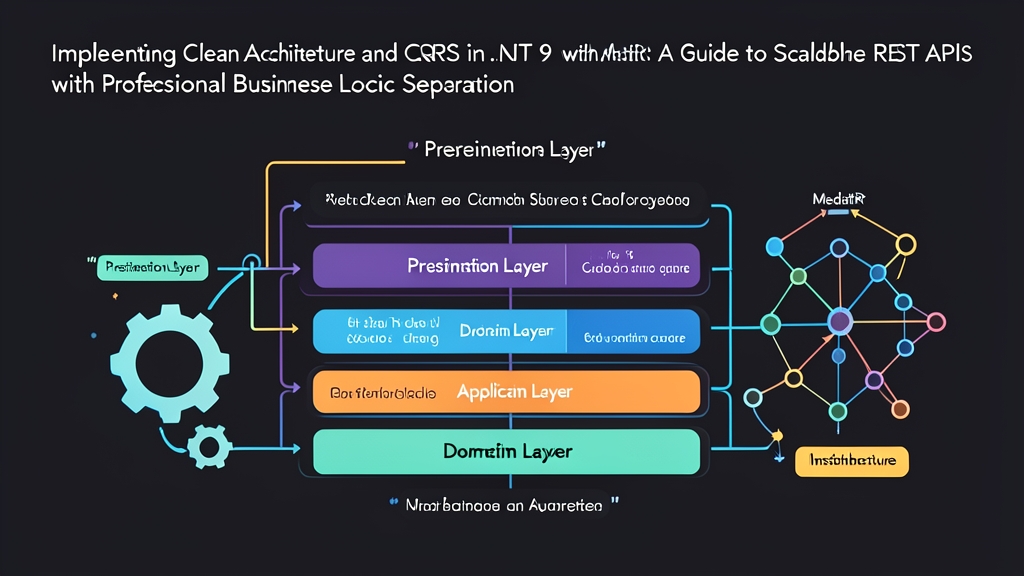
Clean Architecture organizes code into concentric layers. Dependencies point inward only. Inner layers define contracts; outer layers provide implementations.
- Domain Layer: Contains core entities, value objects, business rules, and domain exceptions. It has zero external package dependencies.
- Application Layer: Orchestrates use cases. It defines repository interfaces, DTOs, MediatR commands, queries, and business pipelines.
- Infrastructure Layer: Handles external concerns. This includes EF Core DbContexts, Redis caches, SendGrid clients, and background workers.
- Presentation Layer: Exposes the system to the outside world using ASP.NET Core Controllers or Minimal APIs.
Inside the Application layer, we implement CQRS (Command Query Responsibility Segregation). CQRS separates read operations from write operations:
- Commands: Change system state (such as
CreateProductCommand). They focus on validation and domain invariants. - Queries: Retrieve data without modifying state (such as
GetProductByIdQuery). They bypass heavy domain entities and project straight into flat DTOs.
Instead of injecting five different service interfaces into every controller constructor, we inject MediatR’s ISender. MediatR serves as an in-process mediator. The controller dispatches a request object, and MediatR delivers it to the matching handler. In a codebase with 12 engineers working across 50 endpoints, this pattern slashes merge conflicts and keeps controller methods under 10 lines.
Hands-On Practice: Building an E-Commerce Catalog API in .NET 9
Let us build a complete catalog service from an empty directory using the .NET 9 CLI.
Step 1: Setting Up the Solution and Projects
Run these terminal commands to generate the four-tier project structure:
# Create solution directory
mkdir CleanCatalog && cd CleanCatalog
dotnet new sln -n CleanCatalog

# Create Core projects
dotnet new classlib -n CleanCatalog.Domain
dotnet new classlib -n CleanCatalog.Application

# Create Outer projects
dotnet new classlib -n CleanCatalog.Infrastructure
dotnet new webapi -n CleanCatalog.Api --use-controllers

# Add projects to the solution
dotnet sln add CleanCatalog.Domain CleanCatalog.Application CleanCatalog.Infrastructure CleanCatalog.Api

# Wire dependencies inward
dotnet add CleanCatalog.Application reference CleanCatalog.Domain
dotnet add CleanCatalog.Infrastructure reference CleanCatalog.Application
dotnet add CleanCatalog.Api reference CleanCatalog.Application
dotnet add CleanCatalog.Api reference CleanCatalog.Infrastructure
Add MediatR and EF Core to their respective layers:
# MediatR v12+ installs core contracts and DI extensions
dotnet add CleanCatalog.Application package MediatR

# Database persistence for Infrastructure
dotnet add CleanCatalog.Infrastructure package Microsoft.EntityFrameworkCore.InMemory

# MediatR resolution in the presentation host
dotnet add CleanCatalog.Api package MediatR
Step 2: Defining the Domain Entity
Delete Class1.cs in CleanCatalog.Domain. Add a self-encapsulating entity named Product.cs:
namespace CleanCatalog.Domain.Entities;

public class Product
{
    public Guid Id { get; private set; }
    public string Name { get; private set; } = string.Empty;
    public string Sku { get; private set; } = string.Empty;
    public decimal Price { get; private set; }
    public DateTime CreatedAtUtc { get; private set; }

    private Product() { } // Required by EF Core

    public Product(string name, string sku, decimal price)
    {
        if (string.IsNullOrWhiteSpace(name))
            throw new ArgumentException("Product name cannot be empty.", nameof(name));

        if (string.IsNullOrWhiteSpace(sku) || sku.Length < 3)
            throw new ArgumentException("SKU must contain at least 3 characters.", nameof(sku));

        if (price <= 0.01m)
            throw new ArgumentOutOfRangeException(nameof(price), "Price must be at least $0.01.");

        Id = Guid.NewGuid();
        Name = name.Trim();
        Sku = sku.ToUpperInvariant().Trim();
        Price = price;
        CreatedAtUtc = DateTime.UtcNow;
    }
}
Step 3: Creating CQRS Handlers in the Application Layer
First, specify the repository contract in CleanCatalog.Application/Common/Interfaces/IProductRepository.cs:
using CleanCatalog.Domain.Entities;

namespace CleanCatalog.Application.Common.Interfaces;

public interface IProductRepository
{
    Task<Product?> GetByIdAsync(Guid id, CancellationToken cancellationToken);
    Task AddAsync(Product product, CancellationToken cancellationToken);
}
Next, implement the command and its handler together inside CleanCatalog.Application/Products/Commands/CreateProduct/CreateProductCommand.cs:
using CleanCatalog.Application.Common.Interfaces;
using CleanCatalog.Domain.Entities;
using MediatR;

namespace CleanCatalog.Application.Products.Commands.CreateProduct;

public record CreateProductCommand(string Name, string Sku, decimal Price) : IRequest<Guid>;

public class CreateProductCommandHandler : IRequestHandler<CreateProductCommand, Guid>
{
    private readonly IProductRepository _repository;

    public CreateProductCommandHandler(IProductRepository repository)
    {
        _repository = repository;
    }

    public async Task<Guid> Handle(CreateProductCommand request, CancellationToken cancellationToken)
    {
        var product = new Product(request.Name, request.Sku, request.Price);
        await _repository.AddAsync(product, cancellationToken);
        return product.Id;
    }
}
Now, create the read query in CleanCatalog.Application/Products/Queries/GetProductById/GetProductByIdQuery.cs. Notice how the handler returns a flat DTO instead of exposing the domain entity directly:
using CleanCatalog.Application.Common.Interfaces;
using MediatR;

namespace CleanCatalog.Application.Products.Queries.GetProductById;

public record ProductDto(Guid Id, string Name, string Sku, decimal Price, DateTime CreatedAtUtc);

public record GetProductByIdQuery(Guid Id) : IRequest<ProductDto?>;

public class GetProductByIdQueryHandler : IRequestHandler<GetProductByIdQuery, ProductDto?>
{
    private readonly IProductRepository _repository;

    public GetProductByIdQueryHandler(IProductRepository repository)
    {
        _repository = repository;
    }

    public async Task<ProductDto?> Handle(GetProductByIdQuery request, CancellationToken cancellationToken)
    {
        var product = await _repository.GetByIdAsync(request.Id, cancellationToken);
        if (product is null) return null;

        return new ProductDto(
            product.Id,
            product.Name,
            product.Sku,
            product.Price,
            product.CreatedAtUtc);
    }
}
Step 4: Implementing Infrastructure with EF Core
Build the database persistence logic inside CleanCatalog.Infrastructure/Persistence/AppDbContext.cs and ProductRepository.cs:
using CleanCatalog.Application.Common.Interfaces;
using CleanCatalog.Domain.Entities;
using Microsoft.EntityFrameworkCore;

namespace CleanCatalog.Infrastructure.Persistence;

public class AppDbContext : DbContext
{
    public AppDbContext(DbContextOptions<AppDbContext> options) : base(options) { }

    public DbSet<Product> Products => Set<Product>();
}

public class ProductRepository : IProductRepository
{
    private readonly AppDbContext _context;

    public ProductRepository(AppDbContext context)
    {
        _context = context;
    }

    public async Task AddAsync(Product product, CancellationToken cancellationToken)
    {
        await _context.Products.AddAsync(product, cancellationToken);
        await _context.SaveChangesAsync(cancellationToken);
    }

    public async Task<Product?> GetByIdAsync(Guid id, CancellationToken cancellationToken)
    {
        return await _context.Products
            .AsNoTracking()
            .FirstOrDefaultAsync(p => p.Id == id, cancellationToken);
    }
}
Step 5: Writing Lean Controllers
Controllers should translate HTTP requests into application messages and nothing more. Add ProductsController.cs to CleanCatalog.Api/Controllers:
using CleanCatalog.Application.Products.Commands.CreateProduct;
using CleanCatalog.Application.Products.Queries.GetProductById;
using MediatR;
using Microsoft.AspNetCore.Mvc;

namespace CleanCatalog.Api.Controllers;

[ApiController]
[Route("api/[controller]")]
public class ProductsController : ControllerBase
{
    private readonly ISender _sender;

    public ProductsController(ISender sender)
    {
        _sender = sender;
    }

    [HttpPost]
    [ProducesResponseType(StatusCodes.Status201Created)]
    [ProducesResponseType(StatusCodes.Status400BadRequest)]
    public async Task<IActionResult> Create([FromBody] CreateProductCommand command, CancellationToken ct)
    {
        var productId = await _sender.Send(command, ct);
        return CreatedAtAction(nameof(GetById), new { id = productId }, new { id = productId });
    }

    [HttpGet("{id:guid}")]
    [ProducesResponseType(typeof(ProductDto), StatusCodes.Status200OK)]
    [ProducesResponseType(StatusCodes.Status404NotFound)]
    public async Task<IActionResult> GetById(Guid id, CancellationToken ct)
    {
        var result = await _sender.Send(new GetProductByIdQuery(id), ct);
        return result is not null ? Ok(result) : NotFound();
    }
}
Step 6: Registering Services in Program.cs
Open CleanCatalog.Api/Program.cs and wire the services into .NET 9’s dependency injection container:
using CleanCatalog.Application.Common.Interfaces;
using CleanCatalog.Application.Products.Commands.CreateProduct;
using CleanCatalog.Infrastructure.Persistence;
using Microsoft.EntityFrameworkCore;

var builder = WebApplication.CreateBuilder(args);

builder.Services.AddControllers();
builder.Services.AddEndpointsApiExplorer();
builder.Services.AddSwaggerGen();

// Use an in-memory database for local testing
builder.Services.AddDbContext<AppDbContext>(options =>
    options.UseInMemoryDatabase("CatalogDb"));

builder.Services.AddScoped<IProductRepository, ProductRepository>();

// Register MediatR handlers from the Application assembly
builder.Services.AddMediatR(cfg =>
    cfg.RegisterServicesFromAssembly(typeof(CreateProductCommand).Assembly));

var app = builder.Build();

if (app.Environment.IsDevelopment())
{
    app.UseSwagger();
    app.UseSwaggerUI();
}

app.UseHttpsRedirection();
app.UseAuthorization();
app.MapControllers();

app.Run();
Start the API with dotnet run --project CleanCatalog.Api. Navigate to https://localhost:5001/swagger. Send a POST request with {"name": "Mechanical Keyboard", "sku": "KB-980", "price": 129.99}. You receive a 201 Created status code in roughly 15ms. The controller stays untouched, while your domain rule guarantees valid data.
Next Steps
This layout gives you clean isolation between layers. When your product grows from 2 endpoints to 150, you create new command and query records without touching existing handlers.
From here, you can insert MediatR pipeline behaviors to handle cross-cutting concerns like validation (using FluentValidation) and performance logging in a single location. If read traffic spikes, swap ProductRepository.GetByIdAsync with a raw Dapper query or Redis cache hit. The presentation layer will never know the difference.